
Job Profitability OS for US architecture and engineering firms
Job Profitability OS for US architecture and engineering firms
Job Profitability OS for US architecture and engineering firms
The job software that runs your profit, and talks straight to QuickBooks.
The job software that runs your profit, and talks straight to QuickBooks.
The job software that runs your profit, and talks straight to QuickBooks.
Run jobs, time and billing in WorkflowMAX. It syncs both ways with QuickBooks Online, so costs and invoices flow through to your books automatically and every job's profit stays current, with no month-end re-keying.
Run jobs, time and billing in WorkflowMAX. It syncs both ways with QuickBooks Online, so costs and invoices flow through to your books automatically and every job's profit stays current, with no month-end re-keying.

Approve once in WorkflowMAX.
Approve once in WorkflowMAX.
Approve once in WorkflowMAX.
Costs, invoices and payments flow to QuickBooks on their own, so every job's profit stays current.
Costs, invoices and payments flow to QuickBooks on their own, so every job's profit stays current.

On track is not the same as in profit.
On track is not the same as in profit.
On track is not the same as in profit.
A&E firms watch deadlines, capacity and progress closely. Profit is the one number that stays hidden until the job is closed and the invoices are reconciled, by which point it is too late to do anything about it.
A&E firms watch deadlines, capacity and progress closely. Profit is the one number that stays hidden until the job is closed and the invoices are reconciled, by which point it is too late to do anything about it.

Everything is entered twice
Time and costs sit in your job tool. Invoices and payments sit in QuickBooks.
Reconciling eats the close:
Export, match, fix, repeat. The monthly reconciliation becomes a ritual instead of a report.
Profit shows up late:
You find out a job barely broke even after it is finished, not while you could still adjust scope or billing.
Generic tools fight process
Software built for agencies or all-purpose project work was never shaped around how A&E practices quote, track and bill.
Everything is entered twice
Time and costs sit in your job tool. Invoices and payments sit in QuickBooks.
Reconciling eats the close:
Export, match, fix, repeat. The monthly reconciliation becomes a ritual instead of a report.
Profit shows up late:
You find out a job barely broke even after it is finished, not while you could still adjust scope or billing.
Generic tools fight process
Software built for agencies or all-purpose project work was never shaped around how A&E practices quote, track and bill.
Everything is entered twice
Time and costs sit in your job tool. Invoices and payments sit in QuickBooks.
Reconciling eats the close:
Export, match, fix, repeat. The monthly reconciliation becomes a ritual instead of a report.
Profit shows up late:
You find out a job barely broke even after it is finished, not while you could still adjust scope or billing.
Generic tools fight process
Software built for agencies or all-purpose project work was never shaped around how A&E practices quote, track and bill.
Meet the Job Profitability OS
When the books sync both ways, projects become profit you can manage.
When the books sync both ways, projects become profit you can manage.
When the books sync both ways, projects become profit you can manage.
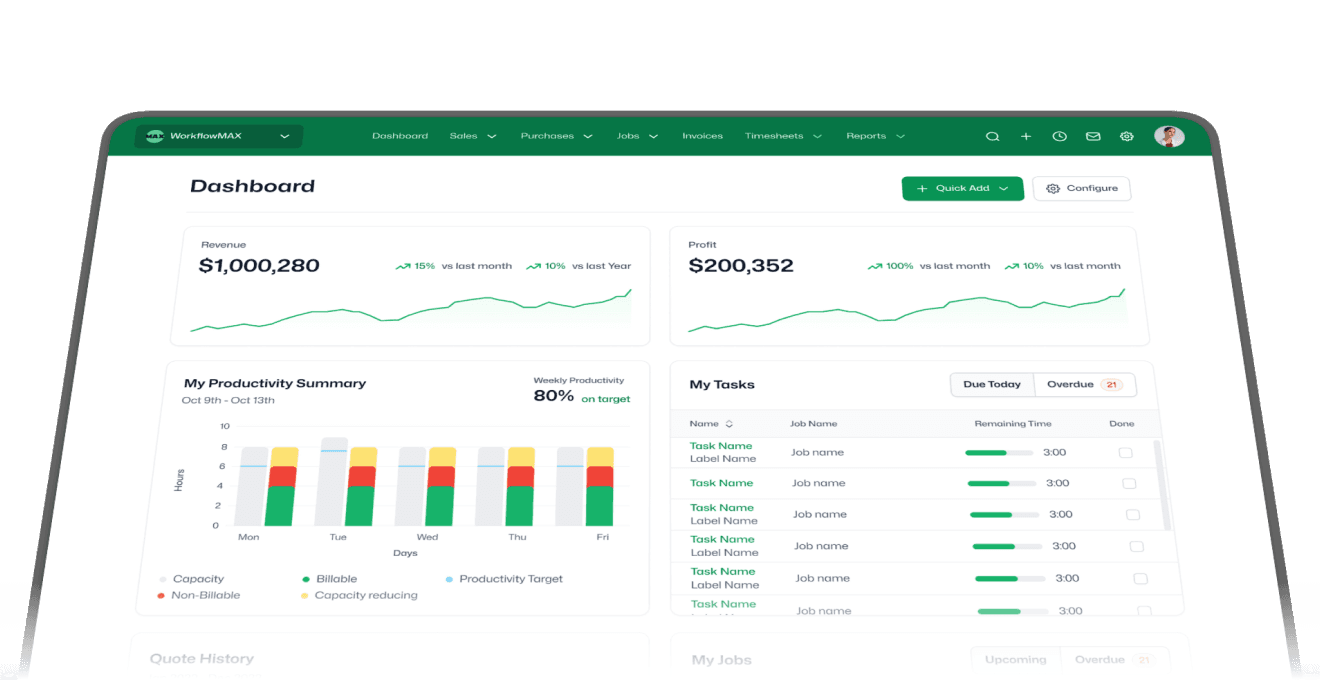
WorkflowMAX connects to QuickBooks Online so the right data moves between them automatically. That two-way link is what turns a project tracker into a Job Profitability OS: every hour and cost flows through to the books, and every job's profit stays current.
WorkflowMAX connects to QuickBooks Online so the right data moves between them automatically. That two-way link is what turns a project tracker into a Job Profitability OS: every hour and cost flows through to the books, and every job's profit stays current.
WorkflowMAX connects to QuickBooks Online so the right data moves between them automatically. That two-way link is what turns a project tracker into a Job Profitability OS: every hour and cost flows through to the books, and every job's profit stays current.

WorkflowMAX to QuickBooks:
Invoices land coded.
WorkflowMAX to QuickBooks:
Invoices land coded.
WorkflowMAX to QuickBooks:
Invoices land coded.
Approve an invoice in WorkflowMAX and it replicates in QuickBooks Online, mapped to the right revenue accounts. Enter a supplier invoice and it creates a payable bill while updating that job's profitability.
Approve an invoice in WorkflowMAX and it replicates in QuickBooks Online, mapped to the right revenue accounts. Enter a supplier invoice and it creates a payable bill while updating that job's profitability.
Both directions: Payments and contacts stay level.
Both directions: Payments and contacts stay level.
Both directions: Payments and contacts stay level.
Customer payments and contact details sync in real time. Update a client in either system and the other keeps up, so you are never re-typing the same record twice.
Customer payments and contact details sync in real time. Update a client in either system and the other keeps up, so you are never re-typing the same record twice.

By design: Your ledger stays clean.
By design: Your ledger stays clean.
By design: Your ledger stays clean.
Purchase orders stay in WorkflowMAX as commitments, not transactions. Receipt one and the cost flows to QuickBooks as a payable, so nothing clutters your accounts before it should.
Purchase orders stay in WorkflowMAX as commitments, not transactions. Receipt one and the cost flows to QuickBooks as a payable, so nothing clutters your accounts before it should.
The job side, handled properly.
The job side, handled properly.
The job side, handled properly.
QuickBooks was never meant to run your projects. WorkflowMAX is, with the tools A&E firms reach for on multiple complex jobs, and the reporting to see what each one earns.
QuickBooks was never meant to run your projects. WorkflowMAX is, with the tools A&E firms reach for on multiple complex jobs, and the reporting to see what each one earns.
01
Job management:
Job management:
Job management:
Manage every job, task and deadline across multiple complex projects from one place.
Manage every job, task and deadline across multiple complex projects from one place.
02
Time tracking:
Time tracking:
Time tracking:
Capture every chargeable minute so nothing billable slips through before invoicing.
Capture every chargeable minute so nothing billable slips through before invoicing.
03
Estimating and quoting:
Estimating and quoting:
Estimating and quoting:
Send customised quotes, estimates and budgets in minutes, then track them against the job.
Send customised quotes, estimates and budgets in minutes, then track them against the job.
04
Invoicing:
Invoicing:
Invoicing:
Build detailed, branded invoices down to the phase, then let the data flow to QuickBooks.
Build detailed, branded invoices down to the phase, then let the data flow to QuickBooks.
05
Reporting and dashboards:
Reporting and dashboards:
Reporting and dashboards:
See where each job stands and what it is earning, based on your live job data.
See where each job stands and what it is earning, based on your live job data.
06
Customisation:
Customisation:
Customisation:
Shape quotes, invoices and reports around the way your practice actually works.
Shape quotes, invoices and reports around the way your practice actually works.
100,000+ professionals
100,000+ professionals
100,000+ professionals
Across 150+ countries run their jobs on WorkflowMAX.
Across 150+ countries run their jobs on WorkflowMAX.

Luphus Oosthuizen
Luphus Oosthuizen
Director at Engenera
Director at Engenera
“WorkflowMAX gives Engenera complete visibility from quote to invoice, helping our team work smarter, control costs, and keep cash flow on track.”
“WorkflowMAX gives Engenera complete visibility from quote to invoice, helping our team work smarter, control costs, and keep cash flow on track.”
“WorkflowMAX gives Engenera complete visibility from quote to invoice, helping our team work smarter, control costs, and keep cash flow on track.”

The questions A&E firms ask first.
The questions A&E firms ask first.
The questions A&E firms ask first.
See your profit on your own jobs.
Book a 20-minute demo with the Americas team and we will show you the QuickBooks sync and live job profitability on an A&E workflow like yours.


See your profit on your own jobs.
See your profit on your own jobs.
Book a 20-minute demo with the Americas team and we will show you the QuickBooks sync and live job profitability on an A&E workflow like yours.
Book a 20-minute demo with the Americas team and we will show you the QuickBooks sync and live job profitability on an A&E workflow like yours.